A property survey number is a unique identification code assigned to a specific piece of land by the state revenue department. If you are looking to pull an Encumbrance Certificate (EC), verify land ownership, or register a deed, having the correct survey number is mandatory. Without it, checking real estate valuations or tracking old transaction records becomes impossible.
100% Online Lookup
Official e-Services Data
Completely Free
Instant FMB & Patta Link
Why the Property Survey Number Matters
The survey number serves as the foundational identity of any real estate parcel in Tamil Nadu. It prevents boundary confusion and catalogs mapping dimensions within the government’s records. You will need this critical code for the following situations:
- Tracking Encumbrance Certificates (EC): When verifying old search registries or current title claims, entering the correct survey and sub-division index is necessary to pull transaction tracking records.
- Validating Land Status: It lists layout boundaries, identifies real partition lines, and notes whether a location is registered as privately owned or public poramboke land.
- Securing Bank Approvals: Financial firms demand official land classification numbers matching structural maps before greenlighting commercial development or mortgage funding packages.
- Resolving Border Claims: It directly references the official Field Measurement Book (FMB), acting as final proof during location disputes or spatial validation updates.
How to Find Survey Number Online Tamil Nadu via e-Services Portal
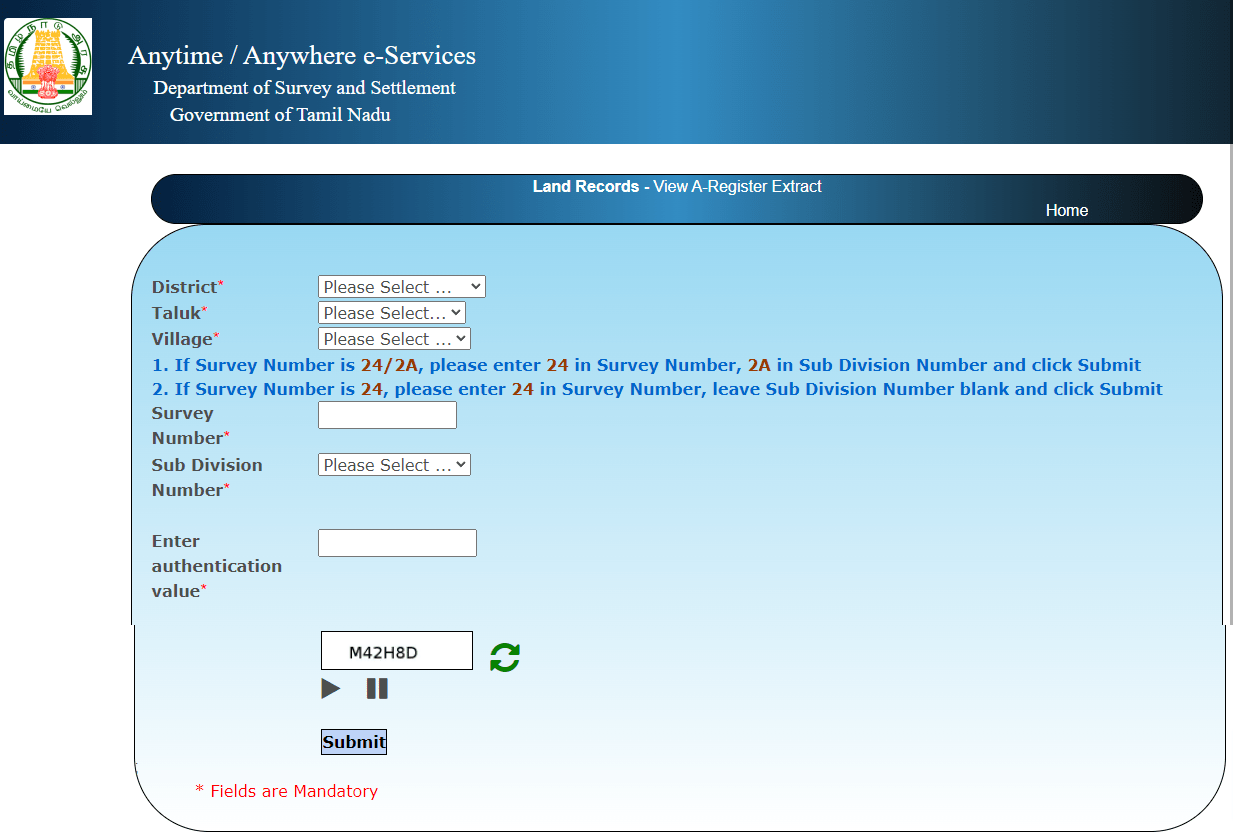
The easiest way to extract your land identification layout digits is through the official Tamil Nadu Land Records portal. Follow these visual operational steps to view your property’s assigned registry parameters:
Visit the Official Land Records Website
Navigate directly to eservices.tn.gov.in. This centralized terminal allows you to access regional revenue details without requiring a paid user subscription profile.
Select “View Patta & FMB / Chitta Extract”
On the primary interface, click on the Patta/Chitta extraction link. This feature will redirect your web browser to the core land document querying engine.
Input Your Regional Details
Choose your property’s specific District, Taluk, and the precise Village where the land partition resides from the cascading dropdown menus. Select the area type based on whether the plot falls into a rural layout or urban municipal block.
Search Using Owner Name Options
If you do not possess the plot code, select the “Name-wise search” checkbox filter. Type the first few characters of the property holder’s official name, fill out the random Captcha security verification field, and press the final verification command.
Extract the Plot Index Details
The web application will instantly output an authentic Patta confirmation summary list. Open your record link to see your plot index, sub-division markers, and spatial area dimensions highlighted neatly on the digital printout sheet.
Alternative Offline and Document Methods
If server communication breaks down or matching name strings do not populate your query list immediately, use these alternative structural tracking channels to discover your correct land classification parameters:
| Method Type | Where to Look / Who to Contact | Details Extracted |
|---|---|---|
| Registered Sale Deed | Property Purchase Documents | Listed under the “Schedule of Property” paragraph block. |
| VAO Consultation | Village Administrative Office | Manual evaluation from the localized physical settlement master logbook. |
| Property Tax Receipt | Municipal Assessment Record | Old structural tax invoices display old assessment links next to the plot id. |
Important Check: When exploring land registry codes for urban development properties, standard survey tags may change into Town Survey Land Records (TSLR) format, grouping properties into Ward codes and Block numbers instead of rural land tracking files.
📚 Related Guides You May Find Helpful
- How to Check Guideline Value on TNREGINET — Instantly verify property valuation data using your newly discovered survey record code.
- EC Online Tamil Nadu Guide — Search track histories and confirm property encumbrance details online.
- Patta Transfer Tamil Nadu Process — Learn how to update ownership records under your target plot index number.
- Property Registration Tamil Nadu — Steps to register real estate layouts smoothly at the local Sub-Registrar Office.
Frequently Asked Questions
Conclusion
Finding your property survey number in Tamil Nadu is a quick, straightforward process thanks to the state’s comprehensive land digitization efforts. Whether you run a name-based search query on the official e-Services dashboard or pull the information straight from your registered purchase deed, tracking down this structural identifier requires less than two minutes online. Ensure your code parameters match your paperwork precisely before proceeding with online property tax payments, title updates, or legal encumbrance inspections.