Free to View Online
Instant Download
Works on Mobile
Records from 1987
What is an EC Certificate?
An Encumbrance Certificate (EC) is an official document that shows the complete transaction history of a property in Tamil Nadu. It confirms whether a property has any loans, mortgages, or legal dues registered against it.
Banks, property buyers, and legal professionals use the EC certificate to verify property ownership and check if the property is free from any financial liabilities. The TNREGINET portal is the official platform by the Tamil Nadu Registration Department to access View & Download EC Certificate Online.
Why Do You Need an EC Certificate?
- To apply for a home loan or mortgage from a bank
- To verify property ownership before purchasing land or property
- To check if a property has any pending dues or legal liabilities
- To complete legal documentation for property registration
- To apply for government schemes related to land and housing
Documents and Details Required
Before you start, keep these details ready:
- Property survey number or document number
- Sub-Registrar Office (SRO) name
- Zone and District name
- Village name where property is located
- Period for EC required (From Date and To Date)
Step-by-Step Guide to View & Download EC Certificate Online
Open the TNREGINET Official Portal
Open your browser and visit the official portal at tnreginet.gov.in. Always use the official government website to avoid fraud sites. The site works on both mobile and desktop browsers.
Login or Register Your Account
Click the Login button at the top right corner. If you are a new user, click Register and create a free account using your name, mobile number, email, and password. Verify your mobile with OTP. Existing users can log in directly.
Go to the EC Search Section
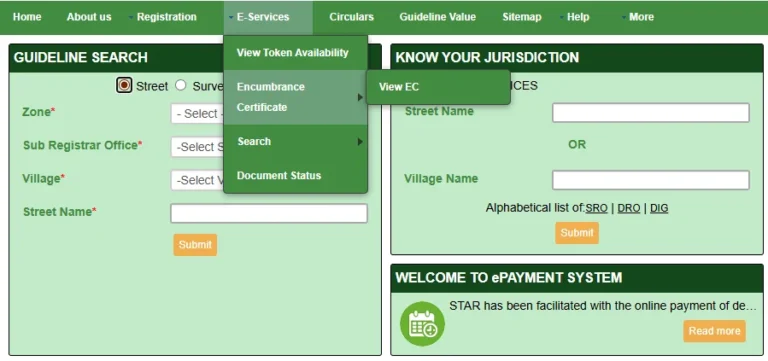
After logging in, look for Encumbrance Certificate in the main menu or under the Services section. Click on EC View or Search EC Online to open the search page.
Select Your Search Method
Option A – By Document Number: Enter the property document number and year if you have it.
Option B – By Property Details: Enter Zone, District, Sub-Registrar Office (SRO), Village name, and Survey number.
Enter the Required Time Period
Enter the date range for which you need the EC certificate. For example, if you need EC records from 2010 to 2026, enter these dates in the From Date and To Date fields accurately.
Search and View EC Details
Click the Search button. The portal will display all property transactions for the entered period including owner name, transaction dates, document numbers, and type of transaction (sale, mortgage, gift deed, etc.).
Download EC Certificate as PDF
Once EC details are visible, click the Download or Print button on the screen. The EC certificate will be saved as a PDF file to your device. This PDF is valid for bank submissions and legal use.
How to Download EC Certificate on Mobile
Open mobile browser and go to tnreginet.gov.in
Login to your registered account
Go to EC Search and enter property details
Click Search and then Download – EC saves as PDF
Common Errors and How to Fix Them
📚 Related Guides You May Find Helpful
- How to Check Guideline Value on TNREGINET Portal – Find the government minimum price for your property before registration.
- Stamp Duty Calculator Tamil Nadu 2026 – Calculate your stamp duty and registration charges instantly.
- TNREGINET Official Portal – Visit the official Tamil Nadu Registration Department portal.
Frequently Asked Questions (FAQ)
Conclusion
Downloading an EC certificate from TNREGINET is simple, free, and instant. By following the steps above, you can view and download your Encumbrance Certificate online in just a few minutes without visiting any government office. For any issues, contact the official TNREGINET helpdesk below.