EC Online Tamil Nadu 2026 – View and Download EC Free on TNREGINET
Completely Free
Instant Results
Works on Mobile
Records from 1987
What is EC Online Tamil Nadu?
EC online in Tamil Nadu simply means checking or downloading your Encumbrance Certificate through the TNREGINET portal, without going to the Sub-Registrar Office. The Tamil Nadu Registration Department has made this service available online so that property owners, buyers, and banks can verify property records from anywhere.
An Encumbrance Certificate shows whether a property has any registered transactions like sale, mortgage, gift deed, or court attachment. If you are buying a property or applying for a home loan, the bank will almost certainly ask for this document.
Earlier, getting an EC meant standing in long queues at the registrar office. Now you can get it in under 5 minutes, sitting at home.
Who Needs EC Online?
- People applying for home loans or property loans from banks
- Buyers who want to verify a property before purchase
- Property owners who need EC for legal documentation
- Lawyers and advocates handling property cases
- Anyone applying for government housing schemes in Tamil Nadu
What You Need Before You Start
Keep these details ready before opening the portal. This will save you time.
- Survey number or document number of the property
- Zone and District where the property is located
- Sub-Registrar Office (SRO) name for that area
- Village name of the property
- The period you want EC for (From year to current year)
How to View EC Online on TNREGINET — Step by Step
Go to the Official TNREGINET Portal
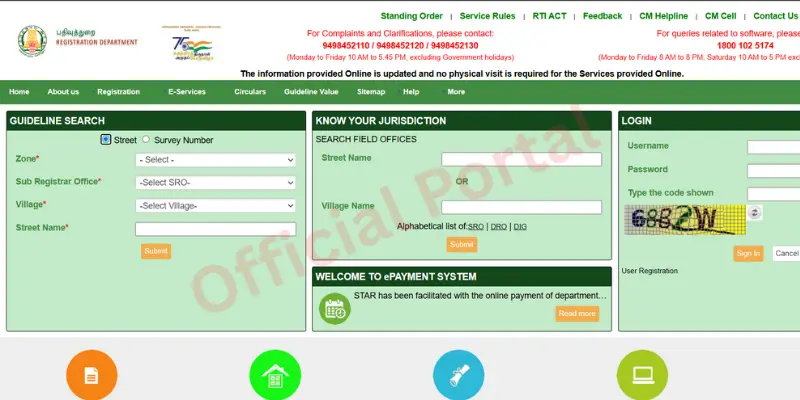
Open your browser and go to tnreginet.gov.in. This is the official Tamil Nadu Registration Department website. Always use this link directly. There are many fake websites that copy the design, so be careful.
Login to Your Account
Click on Login at the top of the page. If you do not have an account, click Register and sign up for free. You will need your mobile number for OTP verification. Registration takes less than 2 minutes. Once logged in, the EC search option will be available.
Find the Encumbrance Certificate Section
After login, look for the Encumbrance Certificate or EC View option in the menu. On some versions of the portal, it appears under Services. Click on it to reach the EC search page.
Fill in the Property Details
You will see a form with multiple fields. Fill them in order:
| Field | What to Enter |
|---|---|
| Zone | Select the zone for your district |
| District | Your property’s district |
| SRO | Sub-Registrar Office for your area |
| Village | Village where property is located |
| Survey Number | From your property documents |
| Date Range | From year to current year |
Click Search and View EC Online
After filling all details, click the Search button. The portal will load the EC records for your property. You will see a list of all transactions, including the owners’ names, dates, and document numbers. This is your EC view online.
Download EC as PDF
Once the EC appears on screen, click the Download or Print button to save it as a PDF. This PDF copy can be used for bank submissions, property verifications, and legal purposes. If the download button is not working, allow popups for the portal in your browser settings.
Important: EC records on TNREGINET are available from 1987 onwards. If your property was registered before 1987, you will need to visit the Sub-Registrar Office in person to get those older records.
What Does EC View Show You?
When you view EC online, the portal shows you a complete history of all registered transactions for that property. Here is what you will see:
| Information Shown | What It Means |
|---|---|
| Owner Name | Current and previous registered owners |
| Document Number | Registration number of each transaction |
| Transaction Type | Sale deed, mortgage, gift deed, partition etc. |
| Registration Date | Date when the document was registered |
| Property Value | Consideration amount for each transaction |
| Nil Encumbrance | Means no loans or dues registered on property |
Common Problems When Checking EC Online
📚 Related Guides You May Find Helpful
- How to Check Guideline Value on TNREGINET – Check the government-fixed minimum price for your property before any transaction.
- Stamp Duty Calculator Tamil Nadu 2026 – Find out exactly how much stamp duty and registration fee you need to pay.
- TNREGINET Official Portal – Go directly to the official Tamil Nadu Registration Department portal.
Frequently Asked Questions
Conclusion
Getting EC online in Tamil Nadu is now simple and takes just a few minutes. The TNREGINET portal has made it possible for anyone to check property records from home, without standing in any queue. Use the steps above, keep your property details ready, and you will have your EC in no time. For any issues with the portal, reach out to the helpdesk directly.