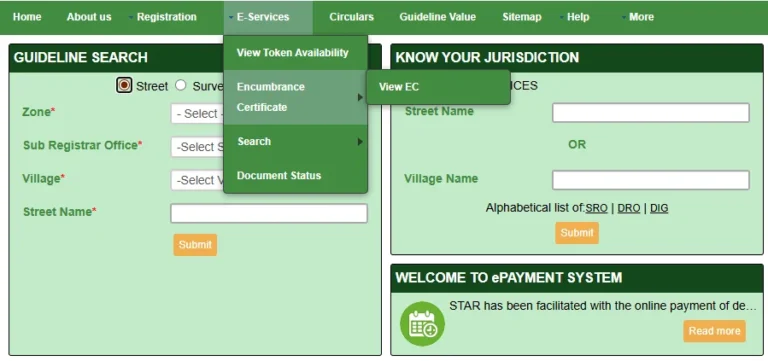
Checking your EC Online Chennai (Encumbrance Certificate) is now a fully digital process. You no longer need to stand in queues at the Sub-Registrar Office to verify property ownership, loans, or legal claims. The Tamil Nadu Registration Department allows you to search and download your Chennai property’s EC directly from the official tnreginet.gov.in portal.
All Chennai Zones
Free to View
100% Online
Instant PDF Download
What is an Encumbrance Certificate (EC)?
An Encumbrance Certificate, commonly known as a Villangam Certificate in Tamil Nadu, is a mandatory legal document that serves as evidence of free title and ownership. It records all registered transactions—such as sale deeds, mortgage loans, gift deeds, and leases—associated with a specific property in Chennai over a specified time period.
If a property has no pending legal dues, active loans, or ownership disputes, the government portal will generate a Nil EC. Generating your EC Online Chennai is the absolute first step before making any real estate investment in the city.
Why Checking EC Online Chennai is Important
Whether you are buying a flat in OMR or a plot in Tambaram, examining the property’s encumbrance history is crucial. Here is why you must perform an EC check:
- Verify Genuine Ownership — Ensure the person selling the Chennai property is the actual, legally registered owner.
- Identify Active Bank Loans — The EC will reveal if the property has been mortgaged to a bank or financial institution. You cannot safely buy a property with an uncleared mortgage.
- Home Loan Approvals — All major banks require a clear Encumbrance Certificate for the last 13 to 30 years before sanctioning a home loan.
- Mutation and Patta Transfer — A clear EC is required by the revenue department to successfully transfer the Patta name after registration.
How to View and Download EC Online Chennai
The TNREGINET portal offers a completely free viewing facility. Follow these step-by-step instructions to pull up the encumbrance history of any Chennai property.
Visit TNREGINET Homepage
Open your browser and navigate to the official TNREGINET portal. While you can search without logging in, registering for a free account allows you to securely save your downloaded certificates.
Navigate to the EC Section
On the main menu bar, hover over the E-Services tab. From the dropdown menu, select Encumbrance Certificate, and then click on View EC.
Choose Your Search Method
You will see two search options: EC (search using Survey Number and Location) or Document-wise (search if you already know the registered document number). Select the one that matches the details you have.
Select Zone as Chennai
If searching by survey number, choose Chennai as your Zone. Then, select your specific District (e.g., Chennai North, Chennai South) and the correct Sub-Registrar Office governing the property.
Enter Dates and Download
Enter the start and end dates for the search period. Input your exact Village, Survey Number, and Subdivision Number. Enter the captcha code and click Search. A Download EC as PDF button will appear at the bottom of the screen to save your file.
Important Tip: Standard property verification in Chennai usually requires a search period of at least 15 to 30 years to guarantee the title is absolutely clean before purchase.
EC Search Fees in Tamil Nadu
Viewing the Encumbrance Certificate online on TNREGINET is completely free of charge. However, if you are legally applying for a digitally signed or physically certified copy, nominal government fees apply:
| Service Type | Government Fee |
|---|---|
| Online EC View / PDF Download (Uncertified) | Free |
| EC Application Fee | ₹1 |
| Search Fee (For the First Year) | ₹15 |
| Search Fee (For Each Subsequent Year) | ₹5 |
| Computerized Additional Fee (post-1987) | ₹100 |
📚 Related Guides You May Find Helpful
- Encumbrance Certificate Tamil Nadu Guide — Master guide for EC rules across all of Tamil Nadu.
- Check Guideline Value Chennai — Find the government-fixed minimum rate for your specific street in Chennai.
- How to Download EC Certificate — Troubleshoot downloading your PDF via the TNREGINET ‘Request List’ feature.
- Stamp Duty Calculator Tamil Nadu — Calculate your exact registration fees before purchasing property.
Frequently Asked Questions
Conclusion
Searching for your EC Online Chennai is an essential, fast, and free process on the TNREGINET portal. Securing this document protects you against fraud, uncovers hidden bank mortgages, and ensures your investment is legally sound. Always cross-check the downloaded certificate against the seller’s original physical documents before proceeding with your registration.